
Features
Transport management software features for Indian transporters
Everything BiltyOne does today: create and print GR/LR (bilty), manage customers, track loads and payments, bill customers and keep every record safe, online or offline.
GR / LR (bilty) creation
Everything a transporter writes on a GR, in one fast form.
Complete GR form
Booking date, route, consignor and consignee with GSTIN, goods, weight or boxes, declared value, vehicle and driver, invoice and e-way bill numbers, insurance and remarks.
Automatic GR numbers
Every GR gets the next number in your series. Numbers are never edited or reused, even after a deletion.
Automatic freight
Rate × quantity, calculated as you type, priced per KM, box, kg, quintal or ton.
Duplicate for repeat loads
Copy an existing GR to a new one with a fresh number, today’s date and status reset to Booked.
Printing and billing
Professional copies and customer bills without retyping anything.
Three-copy print
One PDF with driver, consignor and consignee copies on A5 landscape, for any office printer.
Your letterhead on every copy
Company name, logo, GSTIN, PAN, phone and address from your company profile. Optional sections print only when filled.
Customer freight statements
Pick a customer and date range for a PDF bill with totals, amount paid and balance due, plus every GR.
Billing types and payment status
Mark each GR Paid, To Pay or To Be Billed, and track whether its freight is Pending or Paid.
Customers
Type a regular customer’s details once, never again.
Customer directory
Name, phone, email, GSTIN, address and default pricing for every consignor you work with.
Auto-fill on every GR
Pick a customer and their details and default rate fill in. A new consignor is saved automatically with the GR.
Pincode lookup
Type a 6-digit pincode and the city and state fill in from India Post data.
Customer profiles
Each customer’s phone (tap to call), email, GSTIN with one-tap copy, pricing unit, default rate and billing address.
Records, tracking and data
Every load stays findable, and your data stays yours.
Status tracking
Move each GR from Booked to In Transit to Delivered so anyone in the office can answer customer calls.
Instant search
Find a GR by the start of its number, consignor, consignee, vehicle number or city.
Excel and CSV import
Bring old GRs in from a spreadsheet using the template in Settings; consignors with a GSTIN become customers.
One-click Excel backup
Download every GR as an Excel workbook at any time. No lock-in, no export fee.
Online, offline and at a glance
Use BiltyOne where you work, on the device you have.
Web app on any device
Runs in any modern browser on Windows, Mac, Android or iPhone. Nothing to install.
BiltyOne Desktop (offline)
Free Windows 10/11 app that creates, prints and searches GRs without internet after activation.
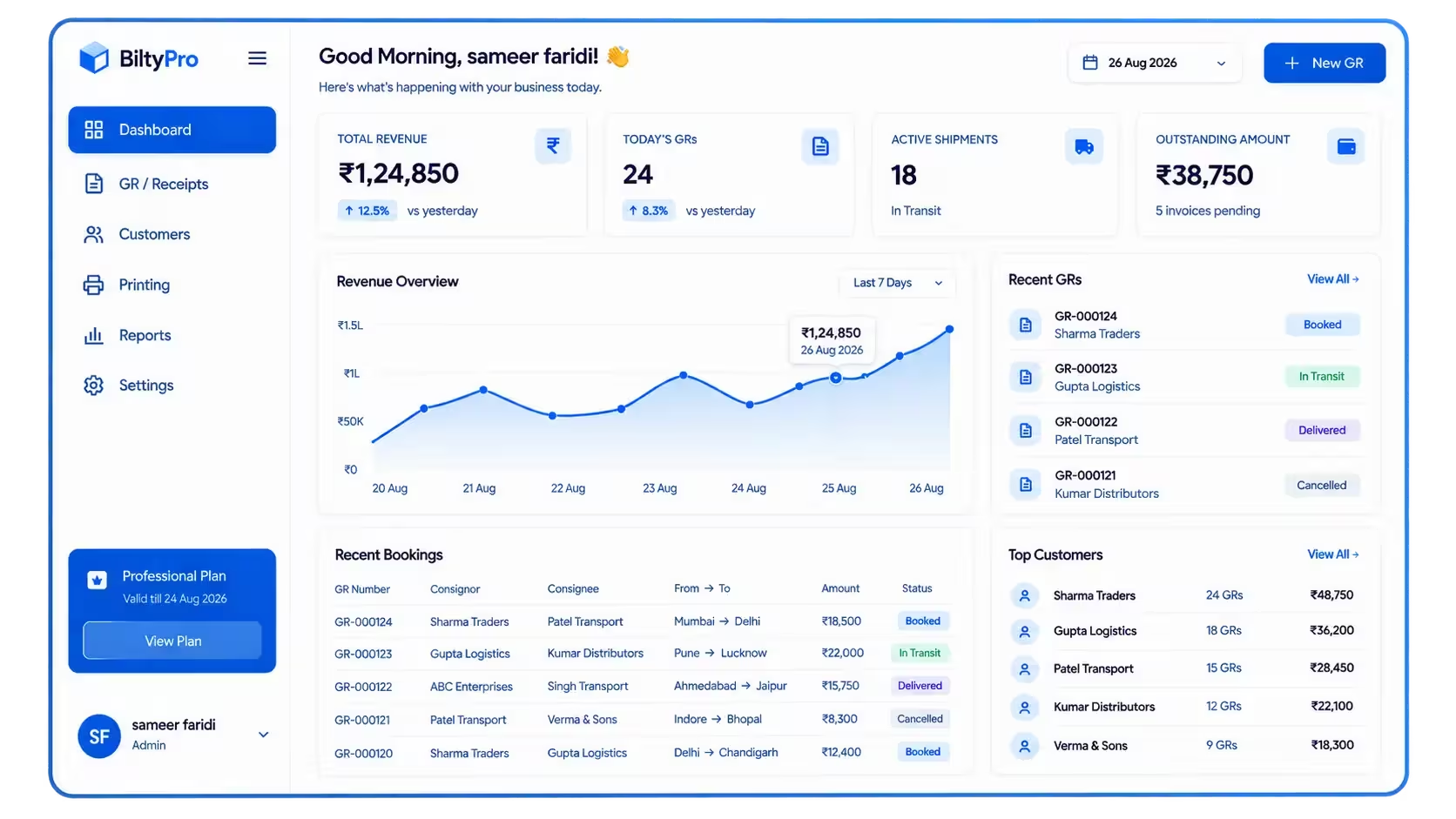
Analytics dashboard
Revenue, GRs booked, loads in transit and outstanding payments on one screen.
Secure by default
Encrypted in transit and at rest, with your data never sold or shared.
BiltyOne dashboard screenshot
How the features work together on one load
Most of these features are steps in one job: getting a load booked, moving and billed. Here is a single GR going through BiltyOne.
- Add the customer once. Save a regular consignor with phone, GSTIN, address and a default rate. Or type a new consignor with their phone and GSTIN on the GR, and BiltyOne saves them as a customer when you save the GR.
- Create the GR. Pick the customer and their details, pricing type and rate fill in. Enter the goods and the weight or boxes; the GR number and freight are filled in for you.
- Print three copies. One PDF holds the driver, consignor and consignee copies, each with your logo, GSTIN and address.
- Update the status. Move the GR from Booked to In Transit to Delivered, so anyone in the office can answer a customer’s call.
- Bill at month end. In the Printing tab, pick the customer and a date range to download one PDF freight bill followed by every GR in that period.
- Keep a backup. Download every GR as an Excel workbook from Settings whenever you like.
Features: common questions
Which freight units does BiltyOne support?
Freight can be priced per KM, box, kg, quintal or ton. BiltyOne multiplies the rate by the quantity as you type and rounds to two decimals, so the freight on every GR matches the rate you agreed. For Per Box the quantity is the box count; for the other units it is the weight or distance you enter.
Does BiltyOne fill in customer details automatically?
Yes. Pick a saved customer on the GR form and their phone, GSTIN, address, pricing type and default rate fill in. A new consignor entered with a phone number and GSTIN is saved as a customer when you save the GR. Typing a 6-digit pincode fills the city and state from India Post data.
Can I duplicate a GR for a repeat load?
Yes. The copy icon makes a new GR with the next number, today’s date and the status reset to Booked. The parties, goods, rate and freight are copied, so a repeat load takes seconds. Check the invoice and e-way bill numbers before printing, because those are copied too.
What does BiltyOne not do?
BiltyOne does not do GPS vehicle tracking, route planning, e-way bill generation, accounting or payroll. It focuses on GRs, customers, freight statements and records, and exports everything to Excel for your accountant. If you use GPS or the e-way bill portal, keep using them and note their numbers on the GR.
Ready to leave the paper behind?
Create your first GR in minutes. Free for early transporters, no credit card needed.