
Short answer
Why billing goes wrong in a transport office
Most billing mistakes in road transport come from the same few places:
- Retyping. Each load is written once in the GR book and again on the bill, so every mistake gets two chances.
- Freight arithmetic. Rate × weight worked out on a calculator, slightly differently by each person at the desk.
- Forgotten To Pay freight. A load is delivered, the freight was meant to be collected on delivery, and nobody notices it wasn’t until month end.
- The month-end rush. Contract customers on To Be Billed accounts expect one bill covering dozens of GRs.
- Disputes. A customer questions the bill, and nobody can quickly show which GRs it covers.
Freight that matches the rate you agreed
In BiltyOne, freight is rate × quantity, rounded to two decimals and calculated as you type. It cannot be typed over by hand, so the freight on the bill always follows from the rate on the GR. Pick a saved customer and their default pricing type and rate fill in, so the rate is the one you agreed with them, not the one the clerk remembers.
Freight can be priced per KM, box, kg, quintal or ton. The full pricing table is on the lorry receipt software page.
Paid, To Pay and To Be Billed
Every GR carries one of the three billing types used in Indian road transport. It prints as a badge on all three copies, so the booking office, the driver and the delivery end all know who pays.
| Billing type | Who pays the freight | When | What BiltyOne does |
|---|---|---|---|
| Paid | Consignor | At booking | Prints a PAID badge on every copy |
| To Pay | Consignee | On delivery | Prints a TO PAY badge, so the delivery end knows to collect |
| To Be Billed (TBB) | The customer, usually the consignor | Later, usually monthly | Prints a TO BE BILLED badge; the GR goes into that customer’s freight bill |
What is on a BiltyOne freight bill
The first page is an A4 freight bill. It contains:
- Your logo, company name, GSTIN and phone, with the title “Freight Bill” and a bill reference.
- Bill To: the customer’s name and phone.
- Bill details: the bill date, total GRs, and a payment status of Fully Paid or Partially Due.
- The GR period, and a count of GRs booked, in transit, delivered and with payment pending.
- A table of every GR: GR number, date, from, to, description, weight, boxes, billing type, freight, payment and status.
- Subtotal freight, total amount, amount paid and balance due.
- Your bank details, if they are in your company profile, and signature blocks for you and the customer.
Every GR in the period then follows on its own A5 page, newest first, so the customer can check each load against the bill before paying.
Month-end billing in three steps
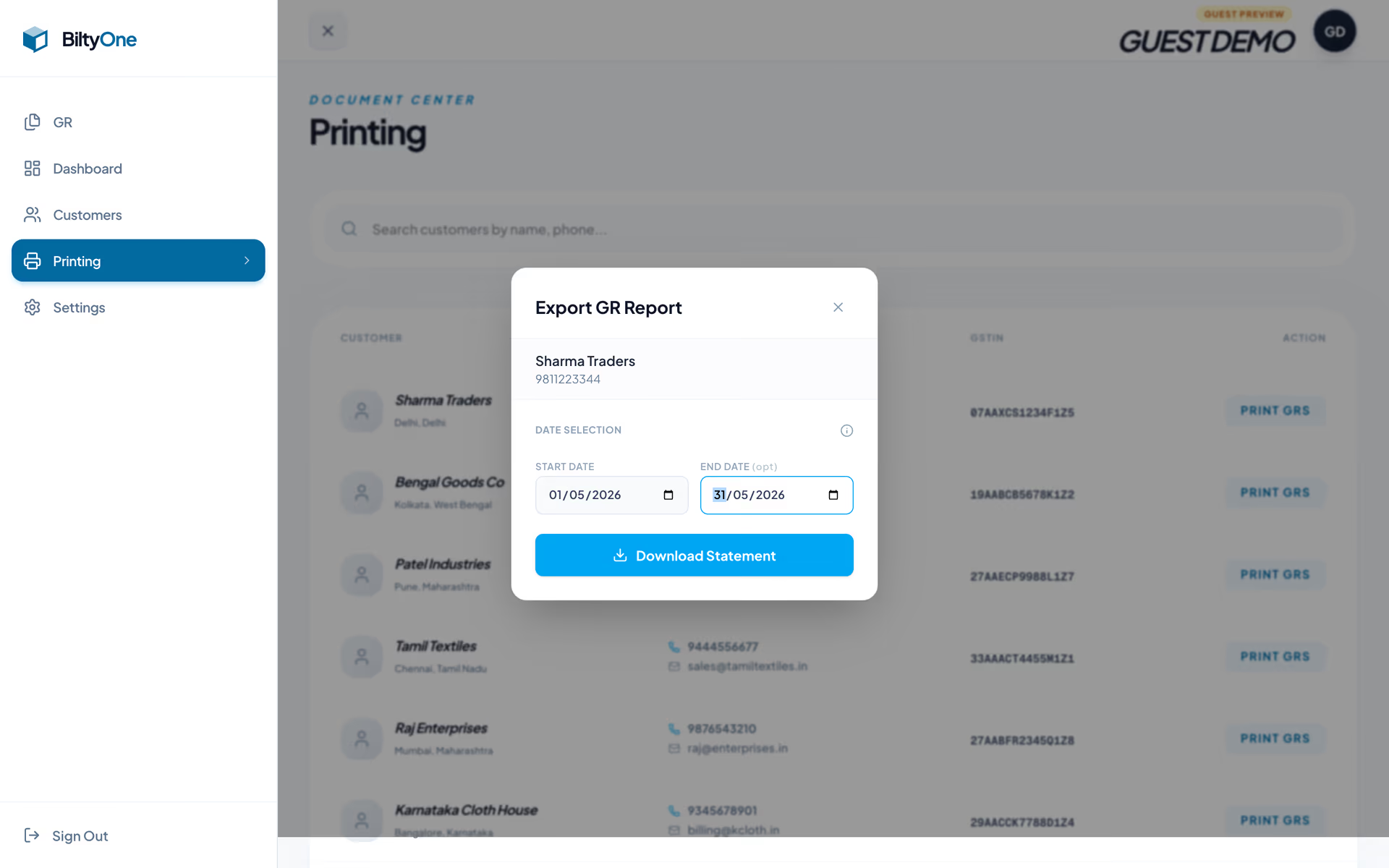
- Open the Printing tab and pick the customer.
- Choose the start date and, if you want, an end date. Leave the end date empty to include everything up to today.
- Click Download Statement. The freight bill PDF downloads straight away.
Only GRs linked to that customer are included, so always pick the consignor from your customer list when you create a GR. Old GRs can be imported from Excel first; imported GRs whose consignor has a GSTIN are linked to that customer.
Knowing what is still unpaid
Every GR shows a payment status, Pending or Paid, in the GR list. The dashboard shows your outstanding amount at a glance, and each customer’s freight bill shows their balance due. Together they answer the question every owner asks at month end: who still owes us, and for which loads?
What BiltyOne billing does not do
BiltyOne handles freight billing for your GRs. It does not file GST returns, generate e-invoices with an IRN, keep ledgers or accounts, reconcile bank payments or collect payments online. Download your GRs to Excel for your accountant, or compare transport ERP software if you need accounting in the same product.